Add something for sale
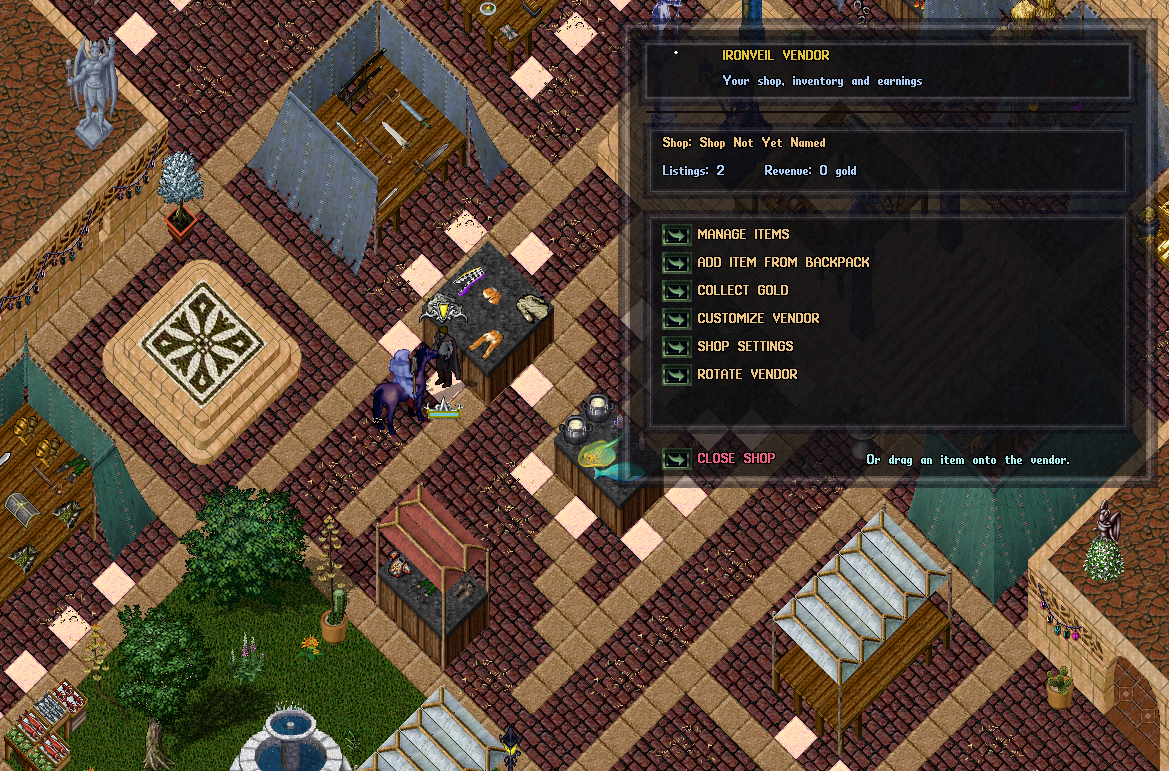
Drag an item from your backpack onto the vendor, or choose Add Item from Backpack in the owner menu and select an item. Set its sale price. An entire stack is one listing; the vendor does not split stacks for partial sales.
IRONVEIL WIKI · TRADING
Open a shop for other players. Choose a permanent market stall tile in Moonglow or place a vendor inside a house you own; both shops use the same selling interface.
CHOOSE A LOCATION
A market tile is a place you own at the public market. A house contract creates a vendor on a valid spot inside your own house. The initial price and what happens when you close the shop are different.
| Moonglow Market tile | House vendor contract | |
|---|---|---|
| Where | A visible pale stone stall tile at the Moonglow Market. Moonglow is the market available now; more markets may be added later. | A free, walkable spot inside a house you own. Stand on that spot when using the contract. |
| How to get it | Double-click an available market stall tile and confirm the purchase. | Buy a house vendor contract from a Provisioner, keep it in your backpack and double-click it at the chosen spot. |
| Initial cost | 50,000 gold, taken from your bank. | 5,000 gold for the contract at the Provisioner. |
| After closing the shop | The tile stays yours. Double-click it to reopen at no new stall charge, or list the vacant tile for resale at a price you choose. | The vendor closes and a new contract returns to your backpack, so you can place it in another house you own. |
| Can it move? | The vendor stays attached to its market tile. The tile itself can be resold once the shop is closed. | You can reposition the vendor to another valid spot in the same house, or close it to reclaim the contract. |
REAL IN-GAME VIEW
The light square stone tiles in this Moonglow screenshot mark the market spaces. The panel on the right is the vendor owner menu. Select the image to inspect it at its original size.
OWNER GUIDE
Once your vendor is placed, double-click it to open the owner menu shown above.
Drag an item from your backpack onto the vendor, or choose Add Item from Backpack in the owner menu and select an item. Set its sale price. An entire stack is one listing; the vendor does not split stacks for partial sales.
Choose Customize Vendor and then Open Vendor Paperdoll. Drag wearable items you already own from your backpack onto the paperdoll to dress the vendor; drag worn items back to your backpack to remove them. Equipped items keep their existing appearance and are separate from sale listings. Dragging an item onto the vendor itself lists it for sale. Customize Vendor also lets you rename the vendor; Shop Settings changes the shop name, and Rotate Vendor changes its facing.
Buyers see the item's actual in-game picture, color and properties before buying. Their payment comes from their bank; sales remain on the vendor until you use Collect Gold to deposit the proceeds into your bank.
Close Shop returns a house vendor contract to the owner's backpack, or leaves an owned market tile vacant for reopening or resale. Unsold goods and held proceeds are recovered to a crate in the owner's bank. Make room in your backpack before closing a house vendor.